
Prime MOQ

What Is Prime MOQ?

Prime MOQ is a Shopify app that blocks checkout when a cart does not meet the order limits you set, and tells the shopper why.

Prime MOQ Team

Prime MOQ Team

Updated ยท 2 min read

Short answer

Prime MOQ enforces order limits on a Shopify store. You set rules for minimum or maximum quantity, case-pack multiples, cart value, shipping weight, or how much one customer can buy over time. A Shopify Function checks every cart at checkout and blocks the order if a rule fails, while a storefront message explains the limit on the product page.

  • Prime MOQ blocks checkout when conditions are not met. It never changes prices.
  • Enforcement runs as a Shopify Function inside checkout, so it cannot be bypassed from the browser.
  • One rule combines a limit type, a counting mode, a product scope, customer eligibility, an optional schedule, and its own message text.
  • The storefront message and the checkout block are two separate layers. Turning the message off does not turn enforcement off.

What Prime MOQ does

Prime MOQ enforces order limits on a Shopify store: minimum order quantity (MOQ), maximum quantity, case-pack multiples, minimum and maximum order value, weight limits, and repurchase limits that stop one customer buying too much over time.

Unlike a discount app, Prime MOQ does not change prices. It blocks checkout when a cart does not meet the conditions you set, and shows the shopper a clear message explaining why, on the product page and in the cart.

Every rule is enforced by a Shopify Function that runs at checkout, so a customer cannot get around it by editing the cart in the browser, using a direct checkout link, or disabling JavaScript. There is no setting that makes enforcement advisory.

Why merchants use it

ProblemThe rule that solves it
Selling below your margin on single-unit ordersMinimum quantity, or a minimum order value
Resellers buying out limited stockMaximum quantity, or a repurchase limit
Products that only ship in cartons of 6, 12 or 24Case pack (sell in multiples of)
Freight-sensitive goods on pallets or LTLWeight-based order limit
Wholesale accounts ordering under your minimumOrder value rule scoped to a customer tag

The building blocks of a rule

Every rule is made of the same six pieces:

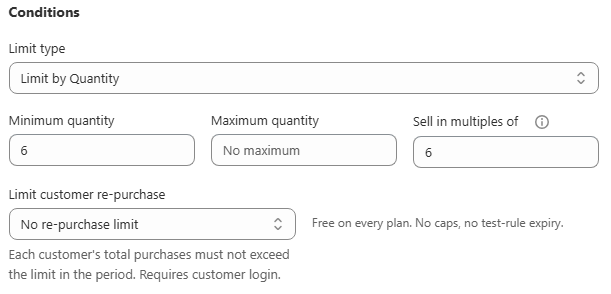
  1. Conditions. The limit type (Quantity, Value or Weight) with its minimum, maximum and multiple values, plus an optional repurchase period.
  2. How to count. Whether each matching product is checked on its own, or all matching products are added together first.
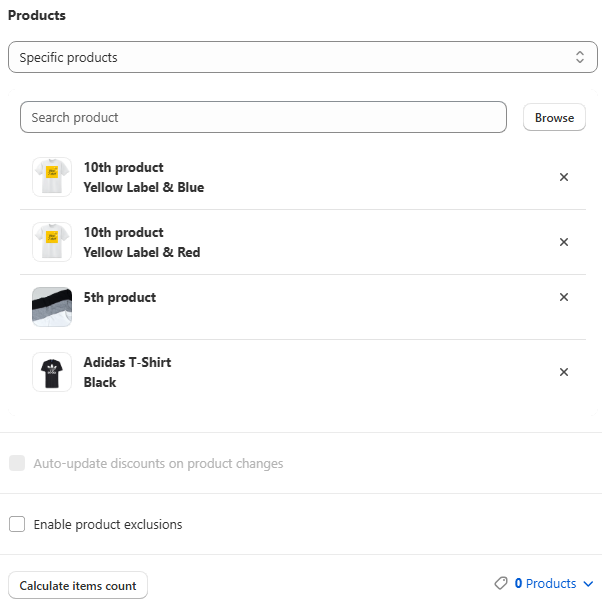
  3. Applied products (scope). Which products, collections, tags, vendors, product types, or the whole store the rule covers.
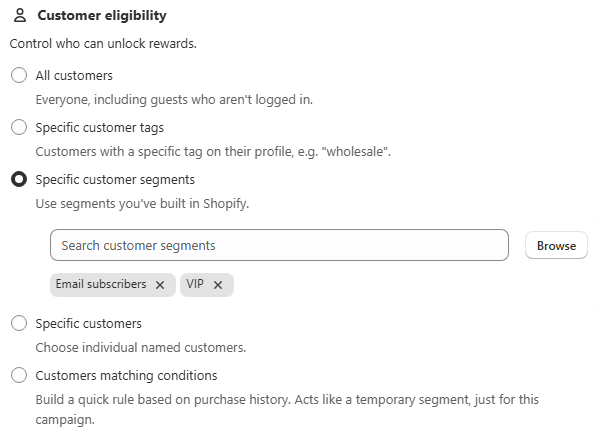
  4. Customer eligibility. All customers, or a specific tag, segment, customer list or purchase-history condition, optionally narrowed by country.
  5. Schedule. Start now or on a future date, with an optional end date.
  6. Messages. The text a blocked shopper sees, per language.

How it differs from Discount Prime

Prime MOQ is built by the same team as Discount Prime, but the two apps solve opposite problems.

Discount PrimePrime MOQ
What it doesLowers the price when conditions are metBlocks checkout when conditions are not met
Storefront elementDiscount badges, tiered price tables, BOGO widgetsOne limit message on the product page and cart
Typical use"Buy 3, get 15% off""You must buy at least 6"

The two apps are aware of each other and run side by side on the same store. A merchant with a case-pack rule in Prime MOQ can still run a Discount Prime volume discount on the same product.

Frequently asked questions

Does Prime MOQ change my product prices?

No. Prime MOQ only decides whether an order is allowed through checkout. Prices, discounts and tiered pricing are untouched, which is why it can run alongside a discount app on the same products.

Can a customer bypass a Prime MOQ rule?

No. The enforcement layer is a Shopify Function that runs server side inside Shopify's own checkout validation. Disabling JavaScript, editing the DOM, or using a direct checkout link all still hit the same check. Only the warning message on the product page is storefront code, and hiding it does not disable the block.

Does Prime MOQ work on Shopify plans other than Plus?

Yes. Prime MOQ works on standard Shopify plans and applies to both retail and B2B checkouts. Shopify's own native quantity rules are limited to Plus and B2B catalogs.

Do I need to write any theme code?

No. The limit message is added through the theme editor's app embeds panel with a toggle, which works on any Online Store 2.0 theme. An app block is available if you want the message in one exact position instead.

How many rules can I create?

There is no cap on the number of rules, and the core rule engine is free on every plan. Some advanced targeting options, such as price-range and variant metafield scopes, are gated to higher plans.

Best for: Any Shopify merchant who needs an order to meet a condition before it can be placed, rather than a discount for meeting one.

Applies to: Shopify Online Store 2.0 themes, Retail and B2B checkouts

Did this answer your question?

Related articles

Still stuck?

Tell us what you are trying to set up and we will reply within 24 hours.

Contact support