
Prime MOQ

The Three Limit Types, Quantity, Value and Weight

Every Prime MOQ rule enforces one of three limit types. Here is what each one measures, the fields it exposes, and how repurchase limits layer on top.

Prime MOQ Team

Prime MOQ Team

Updated ยท 2 min read

Short answer

Prime MOQ has three limit types, chosen from one Limit type dropdown. Quantity counts units and exposes minimum, maximum and sell in multiples of. Value counts cart money and exposes minimum and maximum total value. Weight counts shipping weight in lb or kg. A repurchase period can be layered on any of them.

  • There are three limit types, not six. The six quick-start tiles are pre-filled starting points for the same three.
  • All fields in the active group can be used at once. A minimum of 6 and a multiple of 6 enforce together.
  • Repurchase is an independent control, not a fourth limit type.
  • A repurchase rule reuses the same Maximum quantity field. There is no separate cap field for it.

One dropdown, three types

Every rule enforces one of three limit types, chosen from a single Limit type dropdown in the rule editor's Conditions card. An independent repurchase period can be layered on top of any of them.
Limit typeFieldsTypical use
QuantityMinimum quantity, Maximum quantity, Sell in multiples ofMOQ, per-order caps, case packs
ValueMinimum total value, Maximum total valueWholesale order minimums, spend caps
WeightMinimum total weight, Maximum total weight, Unit (lb or kg)Freight and pallet logic, LTL thresholds

All the fields in the active group can be filled in at the same time. You are not limited to picking one. A Quantity rule with a minimum of 6 and "sell in multiples of 6" enforces both conditions together, which is how you express "one or more full cases."

The six quick-start templates

The tiles you see on the Dashboard and Rules pages before your first rule are pre-filled starting points, not six separate rule categories.

TemplatePre-fillsUnderlying limit type
Minimum quantity (MOQ)Minimum quantity = 6Quantity
Maximum quantityMaximum quantity = 2Quantity
Sell only in case packsSell in multiples of = 6Quantity
Enforce a wholesale minimumMinimum total value = 100Value
Weight limitsMaximum total weight = 100Weight
Block reseller stockpilingMaximum quantity = 2, repurchase period = 30 daysQuantity plus repurchase

Repurchase limits are independent

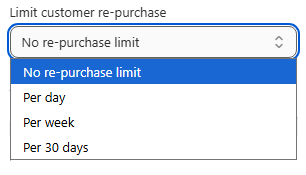
Limit customer re-purchase, also in the Conditions card, is separate from the Limit type dropdown. It can be combined with a Quantity, Value or Weight rule, or used with no other condition at all.

It caps how much a logged-in customer can buy in total over a rolling day, week or 30-day period, checked against their order history. It requires a customer account, because a guest checkout has no history to check against.

A repurchase rule shares the same Maximum quantity field as the Quantity limit type. There is no separate cap field just for repurchase, so if you set both a per-order maximum and a repurchase period, both are enforced from that one number.

Read the full guide for each type

Frequently asked questions

Can one rule use two limit types at once?

No. A rule picks one limit type. It can use every field inside that type at once, and it can add a repurchase period on top, but a single rule cannot check both cart value and cart weight. Since only one rule governs a product at a time, that means picking the constraint that actually governs.

Can I set a minimum and a maximum in the same rule?

Yes, as long as they belong to the same limit type. Minimum quantity 6 with maximum quantity 24 is one rule. Minimum quantity 6 with maximum total value 500 is not.

Is repurchase a fourth limit type?

No. It is a separate control in the same Conditions card and combines with any of the three, or works on its own. Its cap comes from the Maximum quantity field.

Which limit type do the quick-start tiles create?

Four of the six create Quantity rules, one creates a Value rule and one creates a Weight rule. The tiles differ only in which fields they pre-fill.

Does the Weight type read weights from Shopify?

Yes. It uses the weight set on each product or variant in Shopify. A product with no weight counts as zero, which can make a heavy cart pass a maximum-weight rule, so audit your weights before relying on one.

Best for: Anyone deciding how to express a constraint before building the rule that enforces it.

Applies to: Quantity, Value and Weight limit types

Did this answer your question?

Related articles

Still stuck?

Tell us what you are trying to set up and we will reply within 24 hours.

Contact support