
Prime MOQ

Value and weight limits

Order Value Rules, Minimum and Maximum Cart Value

Block checkout until the money value of matching cart lines clears a threshold. The standard way to enforce a wholesale order minimum.

Prime MOQ Team

Prime MOQ Team

Updated ยท 2 min read

Short answer

An order value rule blocks checkout unless the total value of matching products in the cart meets a minimum, stays under a maximum, or both. Set Limit type to Value and fill in Minimum total value or Maximum total value. Combined total is the natural counting mode for a value rule.

  • Value rules are the standard way to enforce a wholesale account minimum.
  • Combined total is almost always the right counting mode. Each item separately would require every line to clear the threshold on its own.
  • Scope the rule to a wholesale tag or segment, or retail shoppers will hit it too.
  • The check uses actual cart line totals, so an active discount lowers the value counted.

What it does

An order value rule blocks checkout unless the total money value of matching products in the cart meets a minimum, stays under a maximum, or both. Choose Value as the limit type in the Conditions card, then set Minimum total value, Maximum total value, or both.

GoalExample
Enforce a wholesale order minimumRequire at least 500 in matching products before checkout completes
Cap a single order's sizePrevent one account placing an unusually large order, for fraud or inventory reasons
Combine with a customer tagApply the minimum only to wholesale accounts, leaving retail shoppers unaffected

Create the rule

Start from the quick-start tile, or from scratch. The Enforce a wholesale minimum tile opens a rule pre-filled with a minimum value of 100. Otherwise go to Rules > Create rule and set Limit type to Value.

Set the minimum, maximum, or both. Enter your amounts in Minimum total value and Maximum total value.
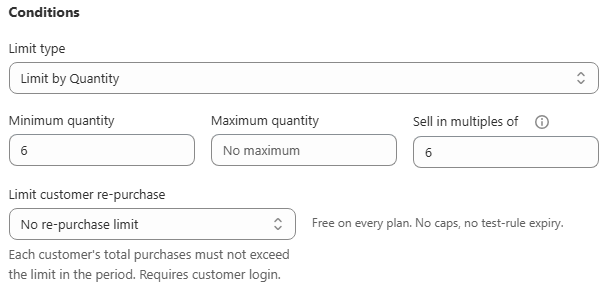
Choose how to count. Combined total is the natural fit for most value rules: the value of every matching product is added together and checked once. Each item separately instead requires every individual matching line total to clear the threshold on its own, which is unusual for a value rule but available.

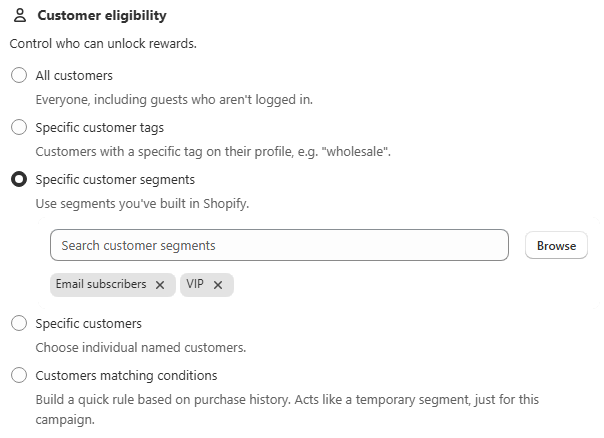
Scope to the right customers. For a wholesale minimum, restrict Customer eligibility to a wholesale tag or segment so retail customers never see it.
Save.

Verify it works

Cart valueExpected result
450, below a minimum of 500Blocked, limit message shown
500Allowed
1,200Allowed

The Preview card's quantity stepper multiplies the sample product's price live, so you can watch the message trigger as the simulated cart value crosses your threshold. Then log in as a matching customer on the live storefront, add products below the threshold, and confirm both the product-page message and the checkout block.

Currency and multi-currency stores

Value amounts are set in your store's default currency. If your store sells in multiple currencies through Shopify Markets, the Currency rounding setting under Settings controls whether converted amounts shown in limit messages are rounded up for cleaner numbers or shown unrounded.

Common mistakes

  • Value includes products outside your intended scope. A store-wide value rule counts every matching product's price, not just the ones you had in mind.
  • Discounted prices versus list prices. The check uses the cart's actual line totals, so an active discount lowers the value counted toward the threshold.
  • A wholesale minimum reaching retail shoppers. This is almost always customer eligibility left on All customers.

Frequently asked questions

Does the minimum order value include shipping and tax?

No. The check runs against the value of the matching cart lines, before shipping and tax are added at checkout.

Do discounts count against the minimum order value?

Yes, and this catches merchants out. The rule reads the actual line totals, so a 20% discount code lowers the value counted toward your threshold. If your minimum needs to be measured before discounts, a quantity-based rule is a more predictable choice.

Which currency is the threshold in?

Your store's default currency. On multi-currency stores, converted amounts shown in the limit message follow the Currency rounding setting under Settings.

Can I apply a minimum order value only to certain countries?

Yes. Under Customer eligibility, switch Countries to Selected countries and pick the ones the rule should apply to. This is common when a freight-driven minimum only makes sense for certain shipping zones.

Should I use Combined total or Each item separately for a value rule?

Combined total, in almost every case. Each item separately would require every single matching product line to clear the threshold on its own, so a 500 minimum would block a 2,000 cart made of ten 200 lines.

Can I set a minimum order value for the whole store?

Yes. Choose All store as the scope with Combined total as the counting mode. Scope customer eligibility too if the minimum is only meant for one group.

Best for: Wholesale and B2B order minimums, and any store needing a spend-based rather than unit-based threshold.

Applies to: Value limit type, Shopify Markets multi-currency stores

Did this answer your question?

Related articles

Still stuck?

Tell us what you are trying to set up and we will reply within 24 hours.

Contact support