
What the setting does
The How to count card sits between Conditions and Products in the rule editor. It decides how the Quantity, Value or Weight condition is checked against the products the rule's scope matches.
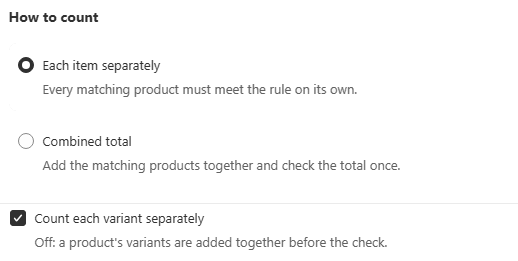
Each item separately. Every matching product in the cart is checked against the condition on its own.
Combined total. Every matching product is added together first, and the condition is checked once against that combined total.
This is a genuinely different rule, not a cosmetic setting. The same "minimum 6" behaves completely differently depending on which mode is active.
Worked example
A rule with minimum quantity 6, scoped to a collection containing products A, B and C.
Mode | Cart: 3 of A plus 3 of B | Result |
|---|---|---|
Each item separately | A has 3 (below 6), B has 3 (below 6) | Blocked, neither product independently meets 6 |
Combined total | A plus B together equals 6 | Allowed, the combined quantity meets 6 |
Neither mode is more correct. Each item separately enforces "every SKU on its own must meet the minimum". Combined total enforces "the whole matching category together must meet the minimum", which is the classic mix-and-match MOQ.
Count each variant separately
When Each item separately is selected, an extra checkbox appears: Count each variant separately.
On, the default. Each variant, such as Small/Red versus Large/Blue, is checked against the condition independently.
Off. A product's variants are added together first and then checked as one unit, so 2 Small plus 4 Large of the same product satisfies a minimum of 6 even though no single variant reaches it alone.
The checkbox is hidden entirely under Combined total, since that mode already sums everything regardless of variant grouping.
Choosing the right mode
Ask whether the condition applies per SKU or across the whole category.
If your minimum is meant to apply to each individual product, for example "every product in this collection has its own 6-unit MOQ", use Each item separately.
If it is meant to apply to the group as a whole, for example "buy any 6 units from this collection, in any mix", use Combined total.
For Each item separately, then decide on variants. If the products in scope have variants that are functionally interchangeable for your minimum, such as colours of the same item, turn Count each variant separately off so customers can mix them to reach it.
When Combined total is selected, the Products card shows an info banner reminding you this is the "entire cart" style of rule, and that narrowing the scope above builds a mix-and-match rule rather than a true whole-cart one.
Common mistakes
The rule blocks orders that should pass. This is the single most common support issue with MOQ rules, and it is almost always How to count set to the opposite of what was intended.
Variants of the same product not combining. Turn Count each variant separately off.
Expecting a difference with one product in scope. With a single-product scope both modes behave identically. The distinction only matters once two or more products can match.