
What it does
A repurchase limit caps how many units of matching products one customer can buy in total across separate orders, checked over a rolling period: per day, per week, or per 30 days.
It is the Limit customer re-purchase control in the Conditions card, and it is independent of the Quantity, Value and Weight limit type above it. It can be combined with any of them, or used entirely on its own.
Goal | Example |
|---|---|
Stop reseller stockpiling | One account buying 2 units today and 2 more tomorrow to bypass a per-order cap |
Fair access on limited drops | Cap total units per customer across the whole drop window, not just per order |
Subscription-adjacent limits | Prevent re-ordering a consumable faster than realistically needed |
How it works
Repurchase checks require the customer to be logged in at checkout. A guest checkout has no purchase history to check against, so a repurchase limit cannot be enforced for one.
The rule totals a customer's purchases of matching products within the chosen rolling period and blocks the order once that running total would exceed the cap.
Repurchase shares the same Maximum quantity field used by the Quantity limit type. There is no separate number field just for repurchase, so if you also set a per-order maximum, both are enforced from that one number.
Create the rule
Start from the quick-start tile, or from scratch. The Block reseller stockpiling tile opens a rule pre-filled with a maximum quantity of 2 and a 30-day repurchase period. Otherwise go to Rules > Create rule and set Maximum quantity to your per-customer cap.
Set the repurchase period. In Limit customer re-purchase, choose Per day, Per week or Per 30 days.
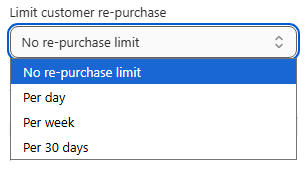
Choose applied products. Scope the rule to the specific drop product or limited collection it applies to.
Save.
Verify it works
Because this depends on order history, testing means placing or already having real prior orders on a test account. The client-side Preview card cannot simulate purchase history, only the per-order Quantity, Value and Weight checks.
Scenario | Expected result |
|---|---|
Customer's first order this period, 2 units | Allowed, at the cap |
Same customer orders 1 more unit inside the period | Blocked, the total would exceed the cap |
A different customer, 2 units | Allowed, limits are tracked per customer |
Guest checkout | Not enforced, repurchase requires a logged-in customer |
Common mistakes
The rule does not block a repeat order. Confirm the customer was actually logged in for both orders. Guest checkouts are not tracked.
Expecting it to behave like a per-order maximum. Repurchase is cumulative across orders in the period. Use a plain maximum quantity with no repurchase period if you only need to cap one order at a time.
Testing takes longer than expected. Results depend on when previous test orders were placed inside the rolling window, so use a dedicated test account.