
What it does
A maximum quantity rule blocks checkout if a cart holds more than a set number of units of the products the rule covers. It is the mirror image of a minimum, used to cap how much any single order can contain.
Goal | Example |
|---|---|
Protect limited stock from bulk buyers | Cap a limited-edition drop at 2 per order |
Stop scalping and resale abuse | Limit a hot item so it cannot be bought out in one order |
Enforce a per-household style cap | Maximum 4 units of a promotional item |
To cap how much a customer can buy across multiple separate orders, pair this with a repurchase limit.
Create the rule
Start from the quick-start tile, or from scratch. The Maximum quantity tile on the Dashboard or Rules page opens a rule pre-filled with a cap of 2. Otherwise go to Rules > Create rule and set Limit type to Quantity.
Set the maximum. Enter your cap in Maximum quantity and leave Minimum quantity blank.
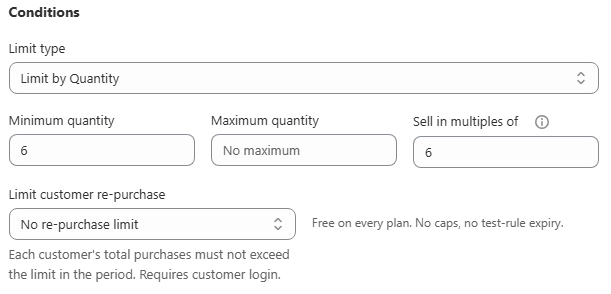
Choose applied products. Scope the rule to the specific product or collection you need to protect. A store-wide maximum is unusual unless you are running a general anti-bulk-buying policy.
Schedule it, if it is drop-specific. If the cap only applies during a limited drop, set a start and end date in Schedule so it turns itself off afterwards.
Save. The rule enforces immediately.
Verify it works
Cart | Expected result |
|---|---|
2 units, at the maximum | Allowed |
3 units | Blocked, limit message shown |
Increase the quantity stepper in the Preview card past your maximum and confirm the message text. Then add more than the maximum to a live cart and confirm checkout is genuinely blocked, not just warned about.
Common mistakes
A maximum does not stop a customer placing two separate orders. A per-order maximum only checks a single cart. Add a repurchase limit for a cross-order cap.
Applied to the wrong products. A store-wide maximum affects every order, including large legitimate wholesale ones, unless you also narrow customer eligibility to exclude your wholesale tags.
Forgotten after the drop. Set an end date so you do not have to remember to remove the cap by hand.