
What it does
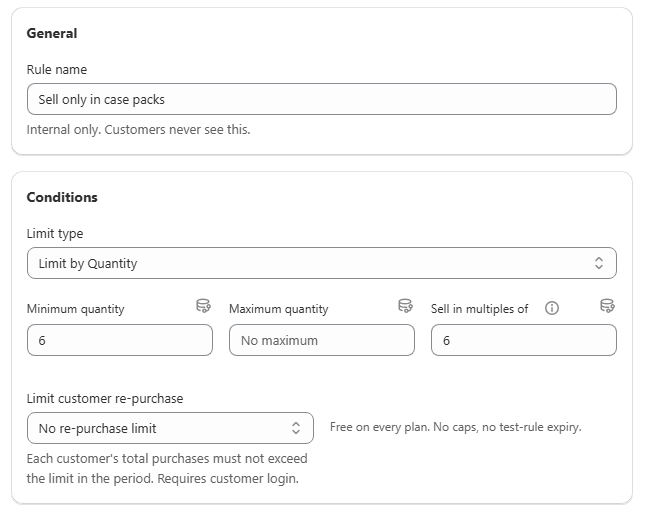
A case pack, or multiple quantity, rule requires the quantity ordered to be an exact multiple of a fixed number. A rule set to 6 allows 6, 12, 18 and 24 units, matching how the product actually ships in cartons. It uses the same Quantity limit type as minimum and maximum rules, through the Sell in multiples of field.
Goal | Example |
|---|---|
Match your packaging | A product only physically ships in cartons of 6 |
Simplify fulfilment | Avoid picking and packing partial cartons |
Combine with a minimum | Require at least one full case, then whole cases after that |
How it is enforced
Any quantity that is not evenly divisible by Sell in multiples of is blocked. Against a multiple of 6, the quantities 5, 7, 10 and 13 all fail, while 6, 12 and 18 pass.
The field combines with Minimum quantity and Maximum quantity in the same rule. Minimum 6 with multiple of 6 and no maximum effectively means "any whole number of cases, starting at one".
Both bounds now have to be exact multiples of Sell in multiples of before the rule will save. A multiple of 3 accepts a minimum of 6, 9 or 12, and rejects 7 or 10. A mismatched combination shows an error naming the field to adjust. Before this validation existed, a mismatched rule saved happily and then enforced each bound independently, which quietly made the real minimum a different number from the one the editor was showing.
Create the rule
Start from the quick-start tile, or from scratch. The Sell only in case packs tile opens a rule pre-filled with multiples of 6. Otherwise go to **Rules
Create rule** and set Limit type to Quantity.
Set the multiple. Enter your carton or case size in Sell in multiples of.
Add a minimum, optionally. To require at least one full case, set Minimum quantity to the same number.
Decide how to count. If the rule covers several SKUs from one product line, choose whether each SKU independently needs to be a multiple of the case size, or whether the whole matching cart does.
Choose applied products and save. Scope to the product line that ships in that case size, then save.
Verify it works
Cart | Expected result |
|---|---|
5 units | Blocked, not a multiple of 6 |
6 units | Allowed |
10 units | Blocked |
12 units | Allowed |
Step the quantity in Preview through a few non-multiple values and confirm the "not a multiple of" message, then check both a valid and an invalid quantity behave as expected on the live storefront.
Common mistakes
Reading minimum plus multiple as a range. Minimum 6 with multiple 6 means "one or more full cases", not "6 upward in steps of 1".
Wrong counting mode for mixed SKUs. If a customer should be able to mix two flavours of the same product to fill a case, use Combined total. If each SKU needs its own full case, use Each item separately.
A confusing message. Write something like "This item ships in cartons of 6, please order in multiples of 6" rather than leaving the generic default.