
What it does
A weight rule blocks checkout unless the total weight of matching products in the cart meets a minimum, stays under a maximum, or both, set in lb, oz, kg or g. It is built for freight-sensitive products where the real constraint is neither unit count nor money value but physical shipping weight.
Goal | Example |
|---|---|
Freight and LTL logic | Only allow orders once total weight qualifies for your carrier's minimum |
Pallet-based shipping | Cap an order at the maximum weight one pallet configuration can safely carry |
Heavy-goods minimums | Require a minimum weight so a shipment is worth dispatching at all |
Product weights have to be right first
The check relies entirely on the weight field on each product or variant in Shopify. If a product's weight is 0 or unset, it contributes nothing to the total, which can make a genuinely heavy order pass a maximum-weight rule.
Audit your product weights before relying on a weight-based rule for freight decisions. This is the single most common cause of a weight rule that never seems to trigger.
Create the rule
Start from the quick-start tile, or from scratch. The Weight limits tile opens a rule pre-filled with a maximum weight of 100. Otherwise go to Rules > Create rule and set Limit type to Weight.
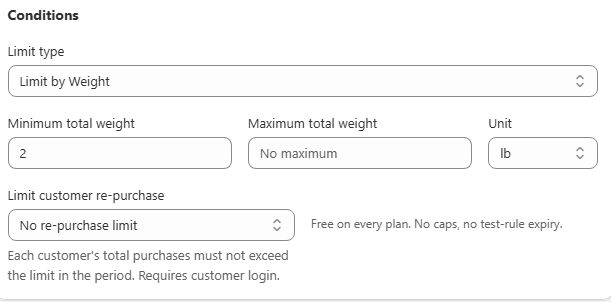
Set the thresholds and the unit. Enter Minimum total weight, Maximum total weight, or both, and choose the Unit. All four Shopify weight units are offered, lb, oz, kg and g, so pick whichever matches how your own products are weighed rather than converting your numbers by hand. Each unit is a separately licensable option, so on some plans one of them can show as Upgrade required instead of being selectable.
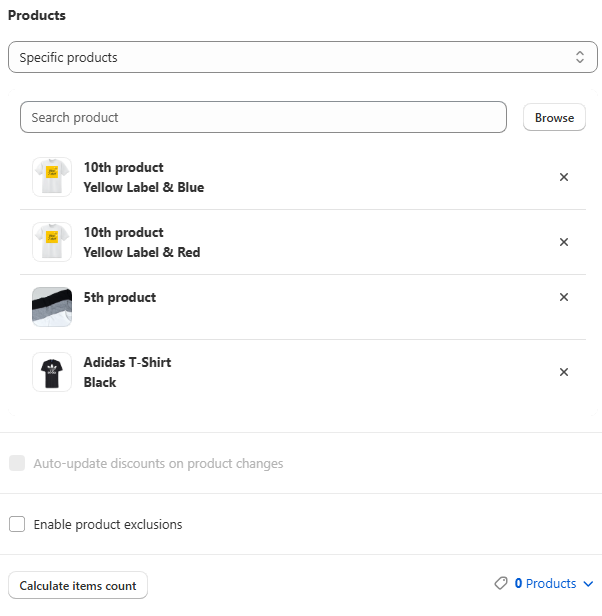
Choose applied products. Scope this to the heavy-goods collection or product type the weight logic applies to. A store-wide weight cap rarely makes sense if you sell a mix of light and heavy products.
Choose how to count. Combined total adds the weight of every matching product together, which is the usual choice for a shipment-level cap. Each item separately requires every individual matching product to independently fall inside the range, which is unusual unless each product is variably weighted.
Save.
Verify it works
Cart total weight | Expected result |
|---|---|
550 lb against a 500 lb maximum | Blocked, limit message shown |
400 lb | Allowed |
The Preview card multiplies the sample product's per-unit weight by the quantity stepper live, so you can watch the message trigger as it crosses your threshold. Then add enough matching weight to a live cart and confirm both the product-page message and the checkout block.
Common mistakes
The rule never triggers. Check that every product in scope actually has a weight set in Shopify. A missing weight is treated as zero.
Unit mismatch. Confirm the threshold is in the unit you intended. Switching the unit does not convert a number already entered, and that applies to every pair of the four units, not just lb and kg.
Light products caught unexpectedly. Narrow the Products scope to the collection the weight logic is genuinely meant for.