
What it is
Prime MOQ's Safe Uninstall page, available any time and shown before you leave through Shopify's own uninstall flow, tells you exactly what will happen to your storefront the moment you remove the app. It also gives you a one-click way to pause enforcement safely first, plus a backup export, before you commit.
Why it matters
The instant Prime MOQ is uninstalled, every active rule stops enforcing immediately. Any order can go through again, including ones below your minimums, off your pack multiples, or over your repurchase limits. There is no grace period.
If you are not ready for that, pause your rules first and preview checkout without your limits before deciding whether to actually uninstall.
The two states
State | What you see |
|---|---|
No active rules | "You're connected. No rules enforcing yet." Safe to uninstall directly, nothing changes at checkout. |
Rules active | "Live and enforcing at checkout." Shows exactly how many rules are currently live. |
Uninstall safely when rules are active
Open Safe Uninstall from the Prime MOQ sidebar, or from Shopify's own uninstall prompt, which links here.
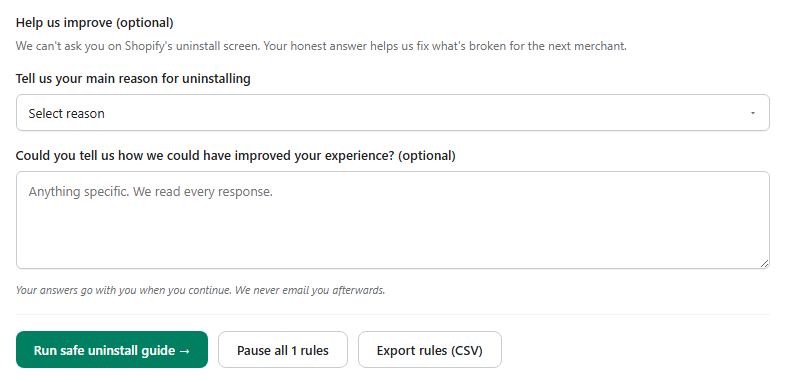
Export your rules first. Click Export rules. This downloads a backup file so your entire setup can be restored later if you reinstall. See Importing and Exporting Rules.
Pause all rules. Click Pause all N rules. This queues every active rule for deactivation and shows live progress until it is confirmed safe, so you can preview your storefront and checkout with limits switched off before deciding whether to uninstall at all.
Uninstall from Shopify Apps. Once paused, click Open Shopify Apps to uninstall, or use the guided modal's Uninstall app button, to go to Shopify's app management page and remove Prime MOQ.
Optional: tell us why
Below the status card, an optional feedback form asks your main reason for uninstalling. Shopify's own uninstall screen does not give us that chance, and your answer helps us fix what is not working for the next merchant. It is genuinely optional and nothing is blocked by skipping it.
Common mistakes
Uninstalling without pausing first. This is the one thing this page exists to prevent. Skipping straight to Shopify's Apps page means active rules stop enforcing the instant the app is removed, with no warning to shoppers who were previously blocked.
Forgetting to export. Reinstalling later without a backup means rebuilding your rules by hand. Exporting is quick and has no downside.