
What it does
Rather than writing the limit message from scratch on every rule, set shop-level default message templates once per language and limit type. That is six fields per language: a minimum and a maximum message for each of Quantity, Value and Weight.
Every new rule starts from these defaults, and any rule message field you have not customised stays in sync with them.
Where to find it
Go to Settings > Message languages. Every published language on your store is listed with a status badge.
Status | Meaning |
|---|---|
Complete | Your primary language, whose built-in English template already counts as its default, or a language with all six fields filled in |
N missing | Some but not all of the six fields have been set |
Not started | None of the six have been set, so the built-in English template is used |
Set a language's defaults
Open Settings > Message languages.
Click Edit or Translate. Use Edit on your primary language, or Translate on any other published language.

Fill in each field. For each of the three limit types, write your default minimum and maximum message text. Leave a field blank to keep using the built-in English template for that specific field.
Save. Every rule's Messages card that has not been individually customised for this language and bucket now shows your new default.
How defaults and per-rule messages interact
A new rule for a given bucket and language always starts from your shop's default text.
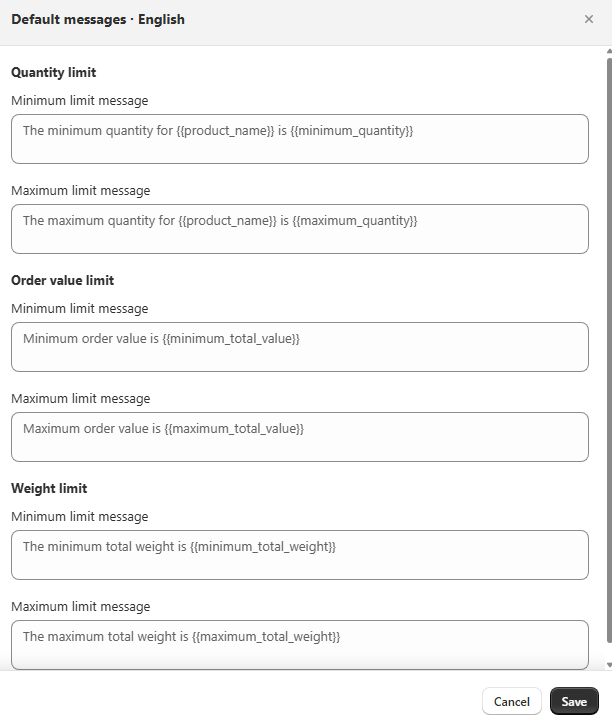
english default If you change the shop default after a rule already exists, any rule whose text still exactly matches the old default is kept in sync with the new one.
A rule where you typed genuinely custom text is never overwritten by a later default change. Only text that still matches a known default gets updated.
Switching a rule's limit type, for example Quantity to Weight, re-syncs its message to the new bucket's default as long as the old text was not customised. Otherwise a Quantity message mentioning "units" would be left behind on a rule that now measures weight.
Common mistakes
Setting defaults too late. Do it before creating a lot of rules. It saves rewriting the same message six times across similar rules.
Reading "Not started" as a problem. That only tracks whether you have written custom text for that language. Shoppers still see the correct built-in English fallback, it is just not localised yet.
Expecting an existing rule to pick up a new default. If that rule's message was already customised away from the old default, it is intentionally left alone. Edit it directly, or click Reset on its message field.