
Two places, two questions
Where | Question it answers | Window |
|---|---|---|
Rules list, Blocked attempts column | Is this rule doing anything? | All time |
Dashboard, Last 7 days card | Is the app doing anything for the store? | Rolling 7 days |
They are deliberately different windows, so the two numbers are not meant to match.
The Rules list column
Open Rules. Every row carries a Blocked attempts count: the all-time number of times that specific rule has stopped an add-to-cart click on your storefront.
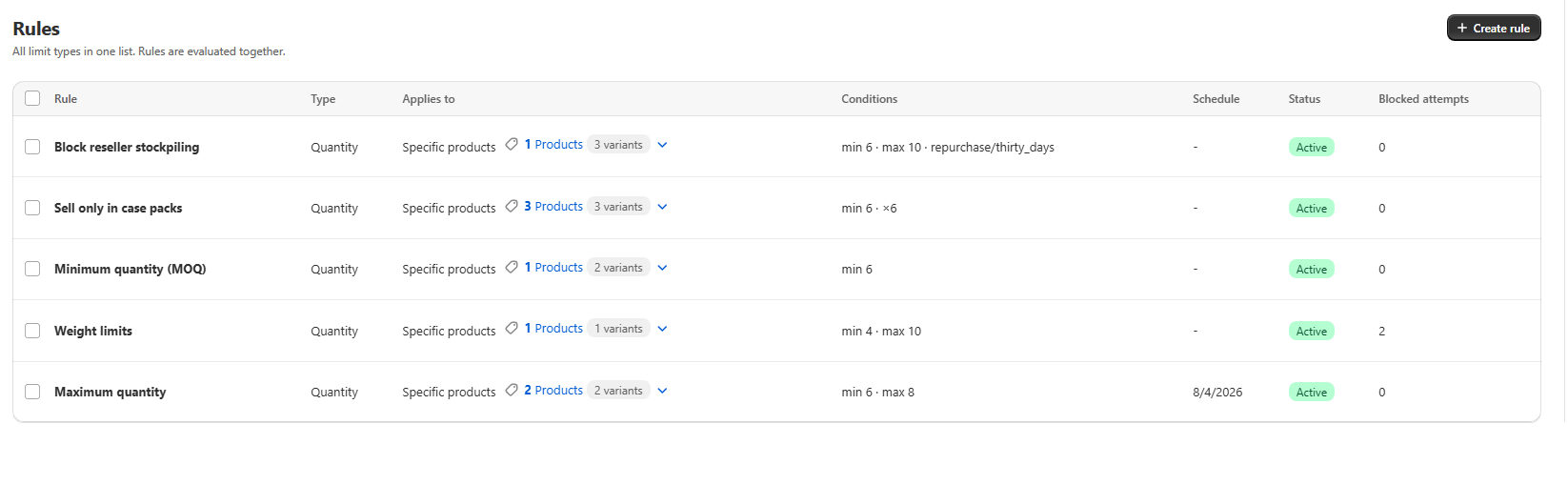
The label says "attempts" rather than "invalid orders" on purpose. The checkout Function runs sandboxed inside Shopify's own checkout and cannot write anything back, and a blocked cart never becomes an order record at all, so there is no such thing as an invalid order to count. A blocked add-to-cart click is the real, already-tracked signal for "this rule is stopping something".
Today's attempts are counted live rather than waiting for the hourly rollup, so a rule you have just tested yourself shows a number straight away instead of sitting at zero for up to an hour.
The Dashboard's Last 7 days card
The Dashboard shows one card with three numbers, covering the last 7 days across your entire store.
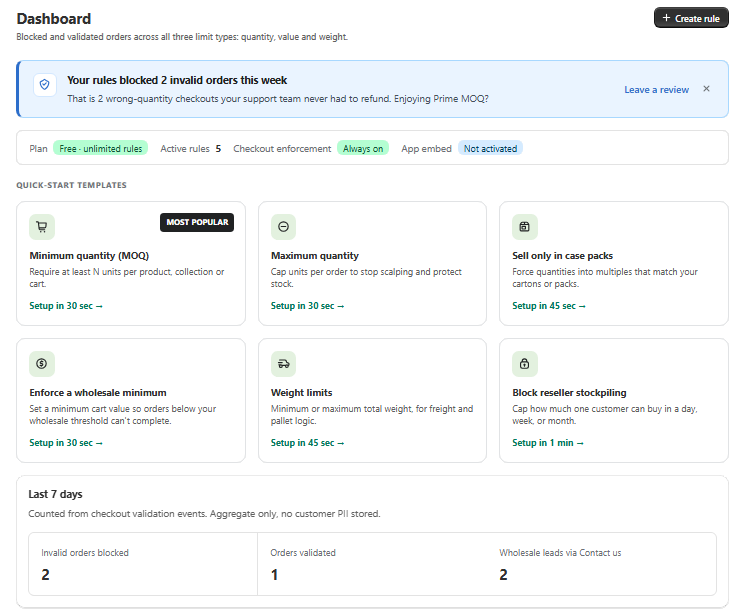
Metric | What it counts |
|---|---|
Invalid orders blocked | Blocked add-to-cart attempts, added up across every rule |
Orders validated | Real orders that came in inside a rule's bounds |
Wholesale leads via Contact us | Clicks on the Contact Us link, if you have enabled it |
Orders validated is counted per rule and per order, so one order that sits inside the bounds of two different rules contributes to the count twice. It is a measure of rule activity, not a count of distinct orders.
The card is aggregate only. No customer identifying data is stored behind any of the three numbers.
Reading the numbers
A high Blocked attempts count means the rule is doing real work. That is also the rule whose message and scope are worth re-reading, since a lot of shoppers are seeing it.
A rule at zero for a long stretch is not necessarily broken. It may be working preventatively, or it may be scoped to products that get little traffic. Check the rule's product match count and its status badge before concluding anything, as covered in Rule Statuses Explained.
Blocked attempts rising while wholesale leads stay flat usually means the Contact us link is off, or is pointing somewhere that does not invite a reply. See Turning a Blocked Order into a Wholesale Lead.
Common mistakes
Expecting Blocked attempts to match an order count. It counts blocked add-to-cart clicks, which can include the same shopper trying several times. It is not a count of customers or of orders.
Comparing the two numbers directly. The Rules list column is all-time and the Dashboard card is the last 7 days. They will not agree, by design.
Treating them as enforcement. Both are read-only reporting. Changing nothing about them changes nothing about what gets blocked.
Forgetting your own testing counts. Every blocked attempt is counted, including the ones you produced verifying a rule yourself.